Introduction
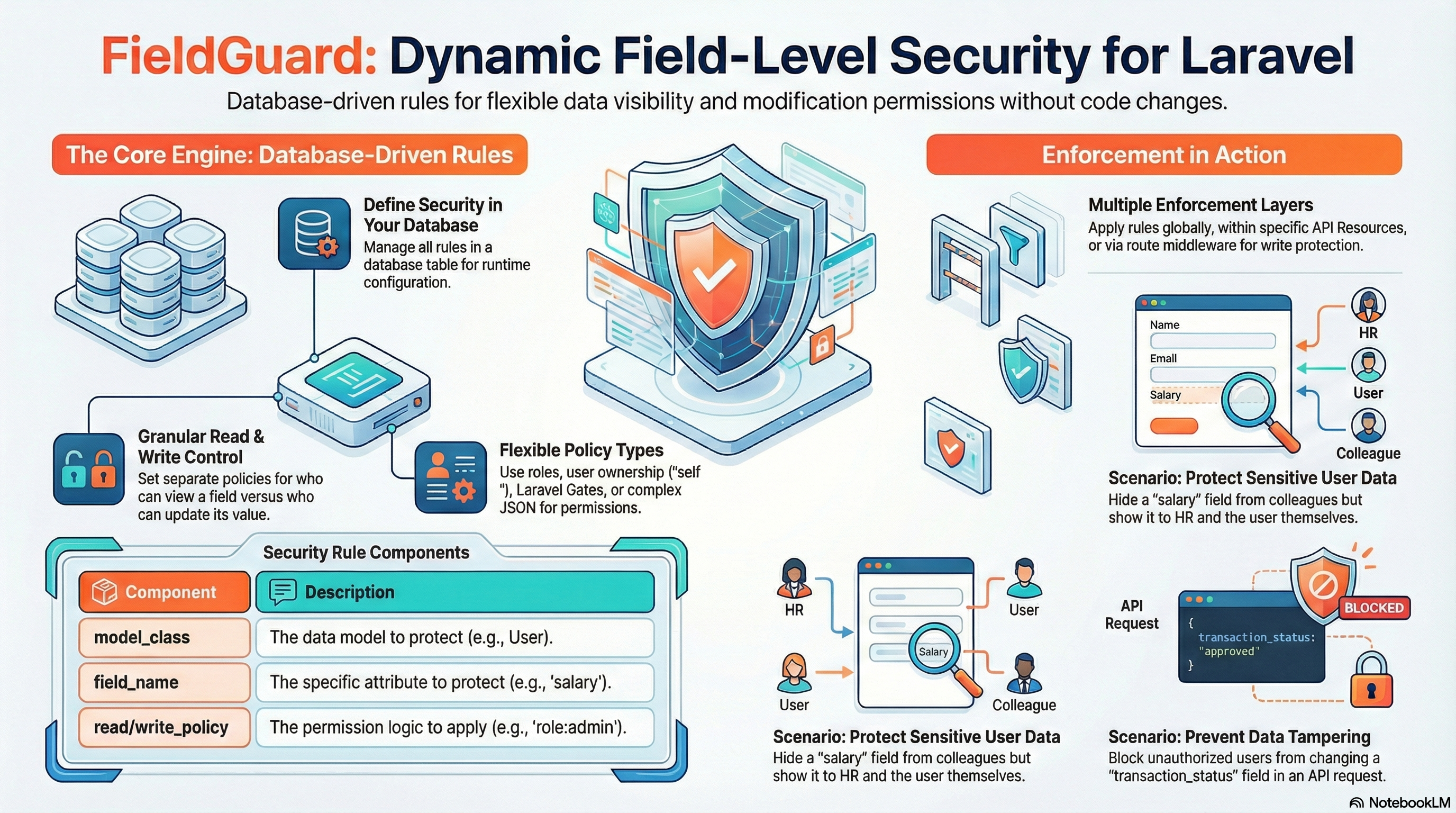
FieldGuard is a lightweight, non-intrusive Laravel package for field-level security on Eloquent models. It allows you to control which users can view or modify specific attributes using dynamic, database-driven rules.
Database-Driven
Manage all security rules via database for runtime configuration without code changes.
Non-Intrusive
No traits, base classes, or attributes required. Keep your models clean.
Granular Control
Separate rules for viewing (Read) and updating (Write) specific attributes.
Performance First
Optimized with Laravel's cache system to ensure zero overhead on hot paths.
Installation
Install the package via composer:
composer require sowailem/fieldguardRun the migrations to create the required field_guard_rules table:
php artisan migrateThe FieldGuard Class
The Sowailem\FieldGuard\FieldGuard class is the heart of the package. It handles rule resolution, permission checking, and attribute filtering.
Core Responsibilities
- Rule Loading: Fetches rules for a specific model class from the database (via
FieldGuardRuleRepository) and handles caching. - Policy Resolution: Interprets different policy types (Gates, roles, self-access, or complex JSON arrays).
- Attribute Masking/Hiding: Modifies model attributes for "Read" operations based on permissions.
- Dirty State Protection: Reverts unauthorized changes for "Write" operations by checking
isDirty()before saving.
Key Methods
| Method | Purpose |
|---|---|
| applyReadSecurity() | Iterates through rules and applies masks or hides fields on the model instance. |
| applyWriteSecurity() | Checks if protected fields were modified and reverts them to original values if unauthorized. |
| checkPermission() | The engine that decides if a user has access based on the defined policy string or array. |
Security Rules
FieldGuard relies on rules created in the database. You can manage these rules using the FieldGuardRule model.
use Sowailem\FieldGuard\Models\FieldGuardRule;

FieldGuardRule::create([
    'model_class' => 'App\Models\User',
    'field_name' => 'salary',
    'read_policy' => ['roles' => ['admin', 'hr'], 'allow_self' => true],
    'write_policy' => ['roles' => ['admin']],
    'mask' => 'PROTECTED',
    'is_active' => true,
]);
Rule Structure
| Field | Description |
|---|---|
| model_class | Fully qualified class name of the Eloquent model (e.g., App\Models\User). |
| field_name | The name of the attribute to secure. |
| read_policy | Permission for viewing the field. Can be a string or JSON object. |
| write_policy | Permission for creating or updating the field. |
| mask | Value to return if read permission is denied (e.g., ***-***-***). If null, the field is removed from the array. |
| is_active | Boolean to enable/disable the rule. |
Policy Types
Policies can be defined in multiple formats to suit your needs:
-
Gate Name: Use any Laravel Gate name (e.g.,
'view-salary'). -
'self': Allows access if the user's ID matches the model's primary key.
-
'role:name': Requires a specific role (expects a
hasRole($role)method on the User model). -
'true' / 'false': Strings that always allow or always deny access.
-
JSON Array: For complex logic (e.g.,
{"roles": ["admin"], "allow_self": true, "gate": "extra-check"}).
Manual Enforcement (Read)
Use the FieldGuard facade to manually filter model attributes. This is perfect for controllers.
use Sowailem\FieldGuard\Facades\FieldGuard;

public function view(User $user)
{
    // Returns filtered attributes array
    return FieldGuard::apply($user, auth()->user());
}
API Resource Integration
The best way to use FieldGuard is within your API resources.
namespace App\Http\Resources;

use Illuminate\Http\Resources\Json\JsonResource;
use Sowailem\FieldGuard\Facades\FieldGuard;

class UserResource extends JsonResource
{
    public function toArray($request)
    {
        return FieldGuard::apply($this->resource, $request->user());
    }
}
Automatic Global Enforcement
FieldGuard can automatically enforce security rules across all models using Eloquent events. This eliminates the need for manual facade calls or traits.
Configuration
Enable it in config/fieldguard.php:
'automatic_enforcement' => true,Automatic Read
Listens to retrieved event. Automatically hides or masks unauthorized fields whenever a model is loaded.
Automatic Write
Listens to saving event. Automatically reverts unauthorized changes to protected fields before they hit the database.
Automatic Middleware Enforcement (Write)
Register the middleware to automatically filter incoming request data before it reaches your controller logic.
Laravel 11+ (bootstrap/app.php)
->withMiddleware(function (Middleware $middleware) {
    $middleware->alias([
        'fieldguard' => \Sowailem\FieldGuard\Middleware\EnforceFieldSecurityMiddleware::class,
    ]);
})
Apply to Routes
Route::put('/users/{user}', [UserController::class, 'update'])
    ->middleware('fieldguard:App\Models\User');
The middleware will automatically remove unauthorized fields from $request->all() before they reach your controller.
API Endpoints
FieldGuard provides a set of RESTful API endpoints to manage security rules dynamically from your frontend or administrative dashboard.
Overview
By default, all API routes are prefixed with /field-guard and protected by auth:sanctum.
/field-guard/rules
['api', 'auth:sanctum']
List Rules
GET /field-guard/rulesRetrieve a paginated list of all security rules.
Response Example:
{
    "data": [
        {
            "id": 1,
            "model_class": "App\\Models\\User",
            "field_name": "salary",
            "read_policy": { "roles": ["hr"] },
            "write_policy": { "roles": ["admin"] },
            "mask": "CONFIDENTIAL",
            "is_active": true
        }
    ]
}Create Rule
POST /field-guard/rulesRequest Body:
{
    "model_class": "App\\Models\\Product",
    "field_name": "cost_price",
    "read_policy": ["admin"],
    "write_policy": ["super-admin"],
    "mask": null,
    "is_active": true
}Update Rule
PUT /field-guard/rules/{id}Update an existing rule by its ID.
Request Body (Partial update supported via PATCH):
{
    "is_active": false,
    "mask": "HIDDEN"
}Delete Rule
DELETE /field-guard/rules/{id}Permanently remove a rule from the database.
Detailed Usage Scenarios
Sensitive User Data
In a company portal, everyone can see basic user info, but only HR and the user themselves should see the salary. Only the Super Admin can change the salary.
// Database Rule for App\Models\User -> 'salary'
FieldGuardRule::create([
    'model_class' => 'App\Models\User',
    'field_name' => 'salary',
    'read_policy' => ['roles' => ['hr'], 'allow_self' => true],
    'write_policy' => ['roles' => ['super-admin']],
    'mask' => 'CONFIDENTIAL'
]);- Employee views own profile: Sees salary.
- HR views employee profile: Sees salary.
- Colleague views profile: Sees "CONFIDENTIAL".
- HR tries to update salary: Change is ignored/reverted.
Dynamic Product Pricing
Show "Wholesale" prices only to verified B2B customers. Standard customers shouldn't even know the field exists.
// Database Rule for App\Models\Product -> 'wholesale_price'
FieldGuardRule::create([
    'model_class' => 'App\Models\Product',
    'field_name' => 'wholesale_price',
    'read_policy' => 'role:b2b-customer',
    'mask' => null // Field will be removed from array
]);
Result: ProductResource will automatically exclude 'wholesale_price' for normal users, preventing leakage of sensitive pricing structures.
Financial Transactions
Protect transaction "status" from being tampered with. Only the system-level 'processor' gate should be able to change it.
// Database Rule for App\Models\Transaction -> 'status'
FieldGuardRule::create([
    'model_class' => 'App\Models\Transaction',
    'field_name' => 'status',
    'write_policy' => ['gate' => 'update-transaction-status'],
]);
Even if a user sends {"status": "completed"} in a PUT request, the fieldguard middleware will strip it out if the update-transaction-status gate fails, ensuring the integrity of your business workflow.
Caching & Performance
Database rules are cached forever to ensure maximum performance. The cache is automatically cleared when you use the FieldGuardRuleRepository to manage rules.
You can manually clear the cache via Artisan:
php artisan fieldguard:clear-cacheThe cache tag can be configured in config/fieldguard.php.
Custom Policy Resolvers
Implement PolicyResolver for custom logic (e.g., integrating with Spatie Permissions).
namespace App\Security;

use Sowailem\FieldGuard\Contracts\PolicyResolver;
use Illuminate\Database\Eloquent\Model;

class MyCustomResolver implements PolicyResolver
{
    public function resolve(array $policy, Model $model, $user): bool
    {
        // Your custom logic for array policies
        return true;
    }
}
Register in config/fieldguard.php:
'resolver' => \App\Security\MyCustomResolver::class,Seeding Rules
Bootstrap your security rules using the provided seeder:
php artisan db:seed --class="Sowailem\FieldGuard\Database\Seeders\FieldGuardRuleSeeder"